
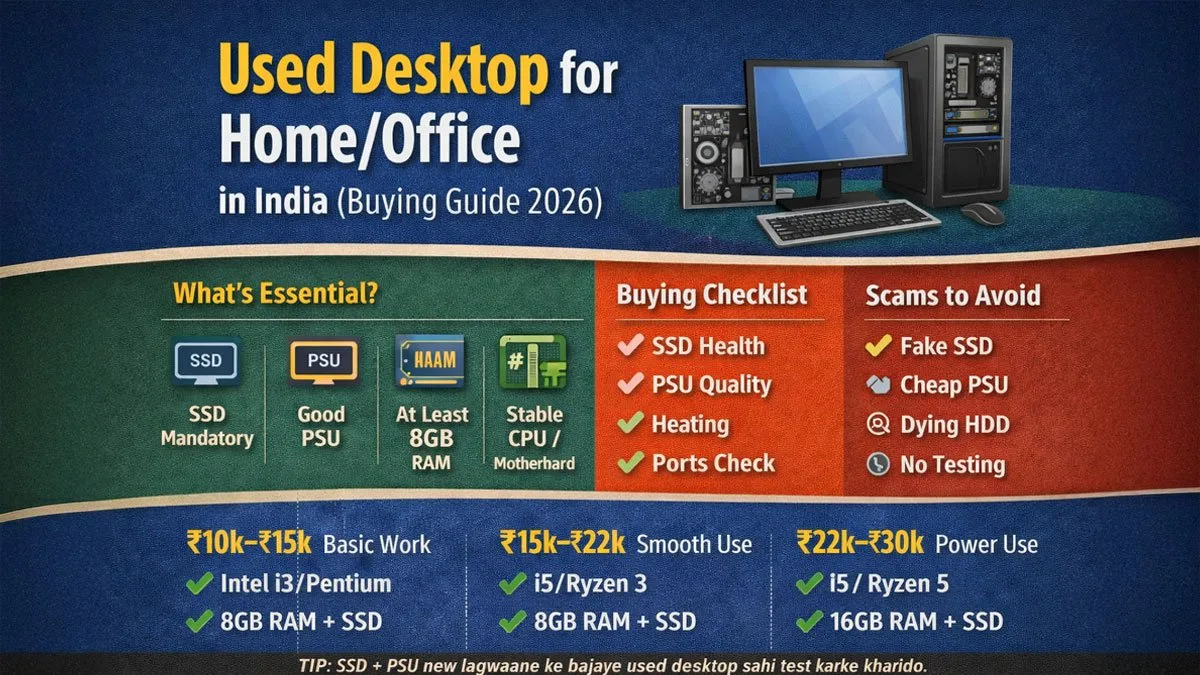
Buying a used desktop for home or office is one of the smartest money-saving decisions in India, only if you buy the right way. Because unlike mobiles and laptops, a desktop is not “one device”. It’s a collection of components:
Processor
Motherboard
RAM
Storage (HDD/SSD)
Power Supply (PSU)
Cabinet + cooling
Monitor (optional)
And the used desktop market has a harsh reality:
Many sellers upgrade the sticker, not the actual quality.
They will claim “i5 + 8GB RAM + 1TB” but inside you’ll find:
Slow HDD
Cheap PSU
Unstable motherboard
Overheating
A dying hard disk
This guide will help you buy a used desktop safely for home/office use without wasting money.
Desktop me sabse zyada scam PSU aur storage me hota hai.
Why Used Desktops Make Even More Sense in 2026
In 2026, one big reason more people are shifting to pre-owned desktops and laptops is simple: hardware upgrade costs are rising.
RAM prices and overall PC component costs have become unpredictable, and upgrading to a new budget system later often becomes expensive. That’s why buying a well-configured used desktop (with decent RAM and an SSD) can offer better value than buying a new low-spec desktop and upgrading it later.
Aaj RAM ke rates skyrocket hain, isliye pre-owned market aur bhi zyada logical choice ban gaya hai.
Is a used desktop worth it in 2026?
✅ YES, especially for home/office users.
In fact, for fixed-location usage, desktops give better value than laptops.
A good used desktop is worth it if:
It has an SSD (or an SSD upgrade is possible)
PSU is decent quality
Motherboard + RAM are stable
Seller gives you proper specs (not vague claims)
You can test performance before paying
Who Should Buy a Used Desktop?
Used desktops are ideal for:
✅ Home Users
browsing
YouTube
online classes
printing/scanning
basic work
✅ Office Work
MS Office / Excel
billing software
Tally
internet + emails
data entry
✅ Students
projects
coding basics
online learning
competitive exam prep
Used desktops are NOT ideal if:
You need portability
You want gaming performance (budget gaming is possible, but risky in the used market)
Used Desktop vs Used Laptop (Which is better?)
This is a common confusion.
Desktop is better if:
✅ You work from one place✅ You want more performance for less money✅ you want upgrade options (RAM/SSD)✅ You want reliability and long-term use
A laptop is better if:
✅ You travel✅ You need portability✅ You want battery backup for power cuts
If you don’t need portability, desktop wins on value.
Also, because RAM prices and component costs have increased in recent years, buying a used PC with better pre-installed specs is often smarter than buying a low-spec new system and upgrading later.
The Two Biggest Rules of Used Desktop Buying
If you remember nothing else, remember these.
✅ Rule #1: SSD is mandatory (or budget for SSD)
If you buy a desktop with only an HDD:
Boot time is slow
system hangs
daily frustration
SSD changes everything.
✅ Rule #2: Never compromise on PSU (Power Supply)
A cheap PSU can damage:
motherboard
RAM
storage
And PSU problems are NOT visible from outside.
PSU weak hua to desktop slowly slowly barbaad karega.
Best Used Desktop Specs by Budget (India 2026)
Let’s be practical. This is what you should aim for.
✅ Budget 1: ₹10,000–₹15,000 Desktop (Basic Home/Office)
Best For
internet
online classes
MS Office
billing
YouTube
Minimum specs target
Processor: Intel i3 (4th gen+) / Pentium (newer)
RAM: 8GB (or 4GB upgradeable)
Storage: 256GB SSD (or 128GB SSD + HDD)
OS: clean Windows install
Avoid
❌ only HDD❌ 2GB/4GB non-upgradeable systems❌ very old dual-core desktops (unless extremely cheap)
✅ Budget 2: ₹15,000–₹22,000 Desktop (Best Value Category)
Best For
smooth office work
multitasking
students + projects
multiple tabs + Excel
Recommended specs
Processor: Intel i5 (4th/6th gen) OR Ryzen 3 (older)
RAM: 8GB minimum (16GB if a good price)
Storage: 256GB SSD minimum
Optional: 1TB HDD for storage
This budget is often the “sweet spot”.
✅ Budget 3: ₹22,000–₹30,000 Desktop (Smooth Productivity)
Best For
heavy Excel
multitasking
office + home power use
basic editing
Recommended specs
Processor: Intel i5 (6th/7th gen+) OR Ryzen 5 (older)
RAM: 16GB preferred
Storage: 512GB SSD ideal
Better cooling + cabinet
✅ Budget 4: ₹30,000+ (If you want editing or heavy work)
At this budget, you must be extra careful, as scammers are also on the rise.
Target:
Ryzen 5 / i7 (but only if verified + tested)
16GB RAM minimum
512GB SSD+HDD
Used Desktop Buying Checklist (Must Read)
This section is what makes your purchase safe.
18 Checks Before Paying for a Used Desktop
A) Confirm Specs Properly (no “i5 only”)
Check exact CPU model (example: i5-6500)
Check the motherboard model
Check RAM brand + speed
Check storage type (SSD/HDD) + size
B) Storage health (most ignored)
SSD/HDD health test (SMART)
Boot time test (fast boot = good sign)
Check for unusual noise (HDD noise = risk)
C) Power supply (most important)
PSU brand and wattage
No local cheap PSU (risk)
The desktop should not restart randomly
D) Thermal + stability
Test for heating (10–15 minutes of use)
Fan noise check
Test CPU load with basic stress
E) Ports & connectivity
USB ports front/back test
HDMI/VGA output test
LAN / WiFi test (if included)
F) General
Check cabinet dents + internal dust
Clean Windows installation (avoid cracked junk OS)
Desktop test kare bina payment mat karo.
Most Common Scams in the Used Desktop Market
This is where most people lose money.
❌ Scam 1: “High specs” but slow PC
Because:
HDD installed
no SSD
Windows full of junk
❌ Scam 2: Cheap PSU
Looks normal, but slowly kills components.
❌ Scam 3: Fake SSD / low-quality SSD
Works for 1–2 months, then fails.
❌ Scam 4: Old PC “refreshed.”
They clean the cabinet + put a new sticker.
❌ Scam 5: No testing allowed
If the seller refuses testing:Avoid
Best Desktop Setup for Home/Office (Recommended)
If you want a “safe, stable configuration”, target this:
✅ i5 6th gen or above✅ 8GB RAM (upgradeable)✅ 256GB SSD minimum✅ branded PSU✅ clean Windows
This configuration will feel smoother than many budget laptops.
What NOT to Buy (Even if cheap)
Avoid these mistakes:
❌ Desktop with only HDD (no SSD)❌ Cheap PSU❌ Unknown motherboard issues❌ “Too cheap” CPU offers❌ PC that restarts/freezes during testing
Sasta desktop = expensive repair.
FAQs – Used Desktop for Home/Office
Resellbazaar Advice
A used desktop is one of the best value purchases in India, but only when you buy component-wise, not “headline-wise”.
✅ SSD mandatory✅ PSU quality matters✅ test before paying
If you follow this guide, your desktop will last for years.